
Download filed GST returns JSON, PDF & Excel
Bulk download GSTR-3B, GSTR-1, 1A, 2A, 2B, IMS, 9 & 9C straight from gst.gov.in without manual copy-paste or captcha hassle. Built for CA firms, Tax Consultants & CFOs.

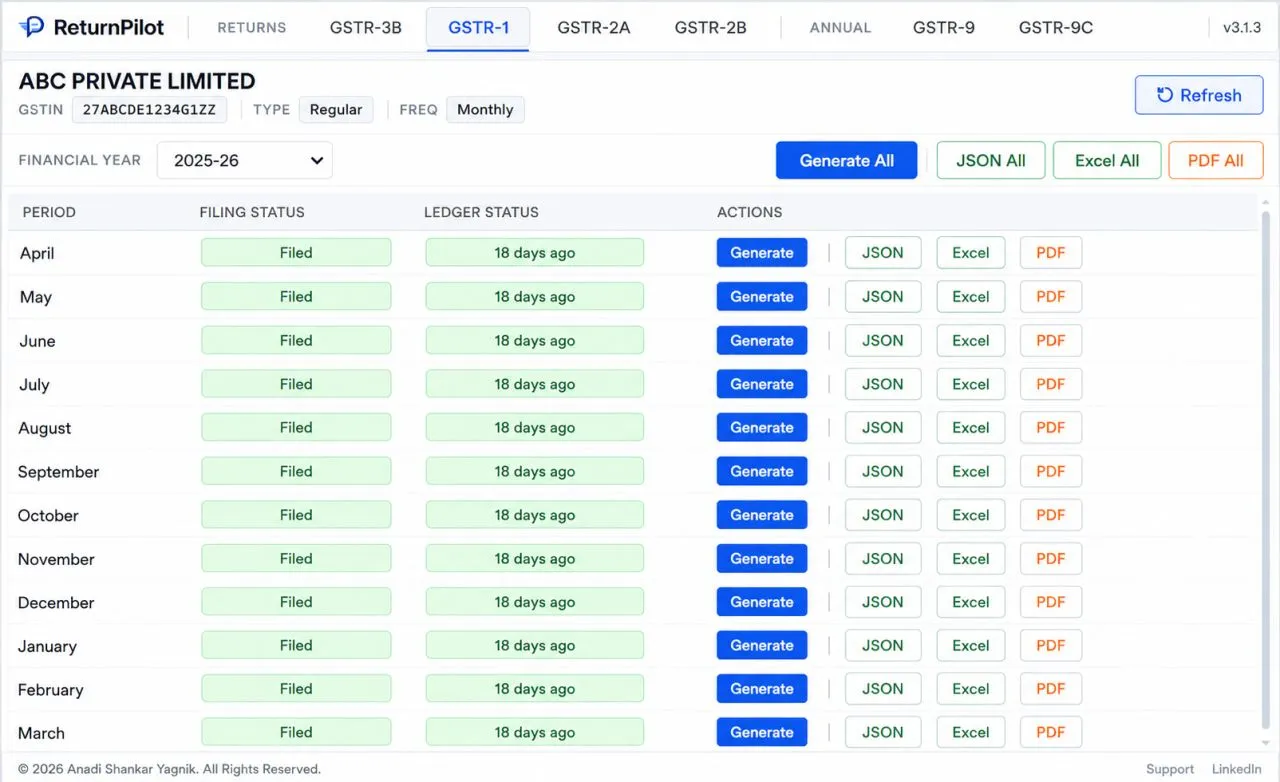
Every return that matters, one click away
Download individual period filings in JSON, PDF & Excel, or generate full-year combined sales and purchase registers instantly.
GSTR-3B
Monthly tax liability & ITC reconciliation
GSTR-1
Outward supplies & sales invoices
GSTR-1A
Invoice amendments & additions
GSTR-2A
Auto-drafted inward supplies
GSTR-2B
Static monthly & quarterly ITC statement
IMSLive
Inward supply invoice management
GSTR-9
Annual return compilation
GSTR-9C
Reconciliation statement & audit
Annual Consolidated Registers (Excel)
Automatically aggregates all 12 monthly/quarterly returns into single audit-ready Excel registers.
Combined Sales Register
Merges an entire financial year's GSTR-1 filings and GSTR-1A amendments into a single, audit-ready Excel workbook. Includes invoice-level B2B, B2CL, B2CS, Exports, Credit/Debit Notes, and HSN summary with automatic tax breakups.
Included in Report
- Full FY compilation (all 12 months in one workbook)
- Invoice-level B2B, B2CL, B2CS & Export ledgers
- Seamless GSTR-1A amendment reconciliation
- HSN-wise quantity and tax rate breakdown
Combined Purchase Register
Combines 12 months of GSTR-2B inward statements and active IMS recipient actions into an extensive purchase register. Organizes supplier GSTIN indexes with total taxable value, CGST, SGST, IGST, and ITC eligibility tags.
Included in Report
- 12-month consolidated inward supply audit grid
- Supplier GSTIN index with cumulative tax totals
- Clear ITC Available vs Ineligible classification
- Ready-to-use for GSTR-9 / 9C & 3B annual reconciliation
Three formats. Every purpose covered.
Whatever you need the data for - sharing, analysis, or systems - there's a format built for it.
JSON
Original portal data
The portal's raw data, byte-for-byte - for developers, power users and permanent machine records.
Share & archive
Clean, print-ready files - perfect for sharing with clients, auditors and banks, or filing away forever.
Excel
Reconcile & analyse
Sheet-ready rows for reconciliation, pivot tables and deep analysis - no manual transcription.
Built for the way tax work actually happens
One-click downloads
Every return period downloads with a single click - no copy-paste, no screenshots, no fiddly portal menus.
Bulk download a full year
Select an entire financial year and export all periods at once. Your archive builds itself.
Monthly & quarterly (QRMP)
Works automatically for monthly filers and quarterly QRMP filers - every period, every time.
Auto login (Premium)
Premium signs you into the GST portal automatically - no more juggling credentials every cycle.
Custom reports (Premium)
Build the exact exports you need - filters, layouts and formats tuned to your practice.
Your data never leaves your computer
Everything is processed locally in your browser. We never see, store or transmit your data.
How to install & use ReturnPilot on the GST Portal
Step-by-step instructions to add ReturnPilot to Chrome, Edge or Brave, configure your portal session, and download filed GST returns in seconds.
Select Your Browser
Installing ReturnPilot on Google Chrome
- 1Open Chrome Web Store: Click the installation button below to visit the official ReturnPilot extension listing.
- 2Add Extension: Click Add to Chrome on the top right, then confirm by clicking Add extension in the browser prompt.
- 3Pin to Toolbar: Click the Extensions icon in your top-right Chrome toolbar, locate ReturnPilot, and click the Pin icon so it stays immediately accessible whenever you visit the portal.
To download 12 full financial year periods uninterrupted without clicking "Save As" on every single file:
ReturnPilot will automatically create client & financial year subfolders and organize files cleanly!
Getting It Working on gst.gov.in
Follow this 6-step walkthrough to log in, sync your client workspace, and download filed returns effortlessly.
Open the Official GST Portal
services.gst.gov.in
Navigate to the official GST login portal. ReturnPilot's content scripts automatically hook into the portal and initialize the login assistant.
- Works directly on services.gst.gov.in & return.gst.gov.in
- No separate third-party software or external desktop apps needed
- Extension icon activates automatically in your browser toolbar
Save Logins & 1-Click Auto-Fill
Credential Vault & Captcha Helper
Click the ReturnPilot icon on the login page. Manage client credentials securely and sign in with high speed.
- Save Client Logins: Store up to 20 accounts on Free or unlimited on Premium
- Bulk CSV Import: Upload multiple clients at once (Format: UserID, Password)
- Auto-Fill Login: Inserts User ID & Password with zero typing
- AI Captcha Solving (Premium): Solves portal captcha in ~50ms and logs in instantly
- Portal Safe & Non-Intrusive: Human-simulated keystrokes with zero scraping scripts (prevents IP rate-limiting or session flags)
Access Return Dashboard
Subdomain Cookie Propagation
After signing in, proceed to the Return Dashboard. ReturnPilot synchronizes authentication cookies across GST subdomains smoothly.
- If you are on the Services page, click 'Go to Return Dashboard' inside ReturnPilot
- Propagates auth session from services.gst.gov.in to return.gst.gov.in
- Eliminates portal 'Access Denied' and session desync crashes
Automatic Client & Period Recognition
Instant Workspace Hydration
ReturnPilot immediately syncs the active client profile, filing frequency, and financial years.
- Pulls legal business name, GSTIN, and registration type (Regular / Composition)
- Automatically identifies Monthly vs Quarterly QRMP filing status
- Choose any Financial Year (FY 2025-26, 2024-25, 2023-24...) from the dropdown
Pick Returns & Download (Single or Full-Year)
8 Return Types Supported
Switch returns via sidebar tabs. Download single periods or export all 12 months at once.
- Supported Returns: GSTR-3B, GSTR-1, GSTR-1A, GSTR-2A, GSTR-2B, IMS, GSTR-9, GSTR-9C
- Single Period: Click JSON, Summary PDF, Detail PDF, or Excel next to any month
- Full Financial Year: Click 'JSON All', 'Summary PDF All', or 'Excel All' in the toolbar
- GSTR-2B includes 29-sheet comprehensive Excel with B2B, B2BA, CDNR breakdown
Audit-Ready Folder Organization
Clean File Hierarchy
Downloaded files are automatically structured and named neatly inside your local Downloads directory.
- Saved Path: Downloads / <GSTIN> / <FinancialYear> / <ReturnType> / <Filename>
- Example: Downloads / 27AAAAA0000A1Z5 / 2024-25 / GSTR2B / GSTR2B_27AAAAA0000A1Z5_042024.xlsx
- No more messy desktop clutter or manual file renaming
Common Portal States & Pro-Tips
Instant answers to common questions encountered when working with active GST sessions.
Ready to automate your GST return downloads?
Install free on Google Chrome, Edge or Brave. No credit card required.
Everything taxpayers ask before installing
Enough to be genuinely useful: download all 8 returns as JSON for up to 3 financial years, and securely save up to 20 GST portal login credentials inside the extension. There's no account, no credit card and no time limit - the free plan is yours forever.
Your next filing, a click away
Install ReturnPilot - GST Return Downloader, log in to gst.gov.in as you always do, and download every return - including the new IMS statement.
Available now on Google Chrome · Mozilla Firefox & Microsoft Edge coming soon · 100% private in your browser
ReturnPilot - GST Return Downloader - your data, on your machine
Effective 1 March 2026 · This policy is short on purpose: the product is built so there is very little to say.
Data we process
Only what you see on gst.gov.in: filed return data you view (GSTR-3B, GSTR-1, GSTR-1A, GSTR-2A, GSTR-2B, IMS, GSTR-9, GSTR-9C), login credentials you choose to save (stored only in your browser). Nothing else in your browser is read, accessed or modified.
What stays on your machine
All conversion (JSON / PDF / Excel) happens locally in your browser. Your filed return data you view (GSTR-3B, GSTR-1, GSTR-1A, GSTR-2A, GSTR-2B, IMS, GSTR-9, GSTR-9C), login credentials you choose to save (stored only in your browser) and any saved login credentials never leave your computer.
Google Sign-In & Profile Data
When you sign in with Google, we receive only your basic profile info (Email address, Name, and Profile Picture) to verify your identity and unlock your Premium subscription. We NEVER request or access your Gmail, Google Drive, or private account data.
What we store for Premium
To deliver Premium, we securely store your email and subscription status (plan & expiry) in a cloud database, accessed only through our server-side functions. Payments are processed by Razorpay; invoices are emailed by our transactional provider.
Saved logins
If you choose to save login credentials, they are stored only in your browser's secure extension storage - never on our servers, and never visible to us.
No trackers, no selling
We do not use advertising trackers or analytics, and we never sell or rent your data. The extension communicates only with the official portal you are already signed in to.
Your rights & Deletion
Uninstall at any time - all local data is removed. You can unlink Google Sign-In or request deletion of your stored subscription record anytime by emailing support@kasyhq.com.
Full privacy policy: Read the complete Privacy Policy - covers Google Sign-In data, payments, invoices and retention.
Questions about this policy? Write to our privacy desk - we reply within two business days.
support@kasyhq.com